


Configuration
Enabling Junction will incur fees. Once enabled, Junction will be billed according to its runtime, regardless of actual usage. Billing will continue until Junction is disabled. Refer to the Pricing & Fee Schedule for more information.
Before enabling Junction, ensure that you have completed the following:
- Create a Virtual Private Gateway.
- Create a Soracom Air for Cellular Group.
- Configure your group's Virtual Private Gateway option to use your VPG.
- Add Air for Cellular subscribers to the group.
If you want to enable Junction Redirection, you must also complete Gate Peer Configuration.
Then, enable Junction for your VPG:
-
Sign in to the User Console . From the Menu, open the VPG screen.
-
From the list of VPGs, click the name of the VPG you want to configure to open its settings page.
-
Click the Junction settings tab.
-
Configure Inspection, Mirroring, or Redirection settings as necessary:
-
SORACOM Junction: Inspection
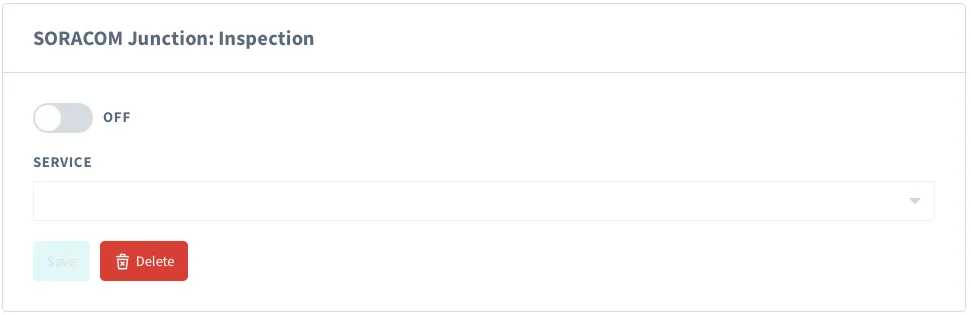
- Enable Inspection by switching the option to ON.
- Enter the configuration parameters:
- Service - The cloud service where packet statistic information will be sent.
- Destination or Topic - The cloud service endpoint.
- Credential set - The credentials to use for this connection. For more information on creating credential sets see the Credential Sets documentation.
- Click the Save Inspection Settings button.
-
SORACOM Junction: Mirroring
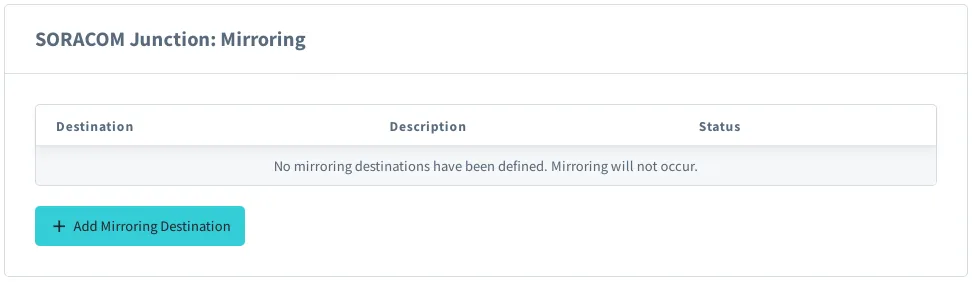
- Click the Add Mirroring Destination button.
- Enter the Mirroring destination IP address, and set the Status to ON.
- Click the Save button.
-
SORACOM Junction: Redirection
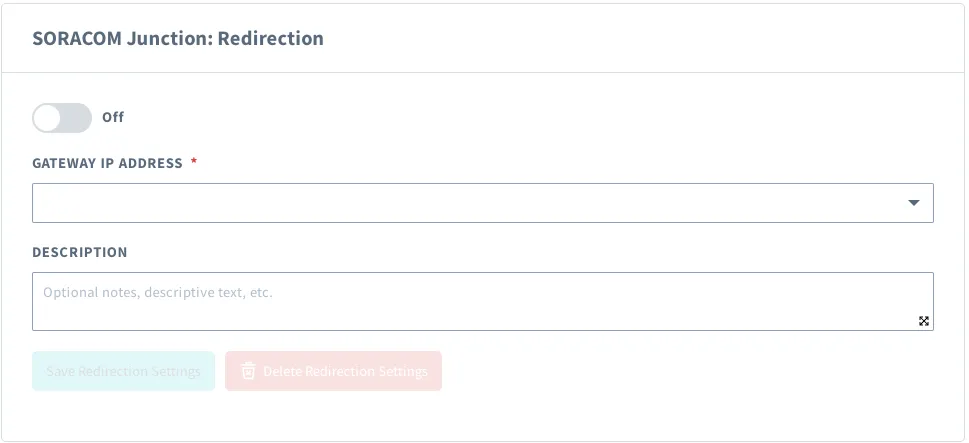
- Enable Redirection by switching the option to ON.
- Click the Gateway IP address dropdown box and select the IP address that corresponds to your Gate Peer.
- Click the Save Redirection Settings button.
-
Settings will take effect immediately.
Advanced Configuration
Soracom Junction settings can also be configured programmatically using the Soracom API or Soracom CLI. In either case, Inspection, Mirroring, and Redirection configuration is specified in the following JSON formats:
Inspection Configuration Format
{
  "enabled": true,
  "report": {
    "credentialsId": "<CREDENTIAL-SET-ID>",
    "enabled": true,
    "destination": {
      "service": "aws-iot"|"kinesis"|"firehose"|"eventhubs"|"pubsub",
      "provider": "aws"|"azure"|"google",
      "resourceUrl": "<DESTINATION-ADDRESS>"
    }
  }
}
Mirroring Configuration Format
{
  "enabled": true,
  "protocol": "gre",
  "description": "<OPTIONAL-DESCRIPTION>",
  "ipAddress": "<DESTINATION-IP-ADDRESS>"
}
Redirection Configuration Format
{
  "enabled": true,
  "gateway": "<GATE-PEER-INNER-IP-ADDRESS>",
  "description": "<OPTIONAL-DESCRIPTION>"
}
[block=api]
Soracom API
Inspection
To configure Inspection settings, use the setInspectionConfiguration API method:
[ui-tabs theme=code] [ui-tab title=Global]
curl -X POST \
|  -H 'Content-Type: application/json' \
|  -b '{ ... Inspection configuration }' \
|  http://g.api.soracom.io/v1/virtual_private_gateways/<VPG-ID>/junction/set_inspection
[/ui-tab] [ui-tab title=Japan]
curl -X POST \
|  -H 'Content-Type: application/json' \
|  -b '{ ... Inspection configuration }' \
|  http://jp.api.soracom.io/v1/virtual_private_gateways/<VPG-ID>/junction/set_inspection
[/ui-tab] [/ui-tabs]
You can remove Inspection settings with the unsetInspectionConfiguration method.
Mirroring
To add a mirroring destination, use the createMirroringPeer API method:
[ui-tabs theme=code] [ui-tab title=Global]
curl -X POST \
|  -H 'Content-Type: application/json' \
|  -b '{ ... Mirroring peer configuration }' \
|  http://g.api.soracom.io/v1/virtual_private_gateways/<VPG-ID>/junction/mirroring/peers
[/ui-tab] [ui-tab title=Japan]
curl -X POST \
|  -H 'Content-Type: application/json' \
|  -b '{ ... Mirroring peer configuration }' \
|  http://jp.api.soracom.io/v1/virtual_private_gateways/<VPG-ID>/junction/mirroring/peers
[/ui-tab] [/ui-tabs]
You can modify a mirroring peer with the updateMirroringPeer method, and delete a mirroring peer with the deleteMirroringPeer method.
Redirection
To configure Redirection settings, use the setRedirectionConfiguration API method:
[ui-tabs theme=code] [ui-tab title=Global]
curl -X POST \
|  -H 'Content-Type: application/json' \
|  -b '{ ... Redirection configuration }' \
|  http://g.api.soracom.io/v1/virtual_private_gateways/<VPG-ID>/junction/set_redirection
[/ui-tab] [ui-tab title=Japan]
curl -X POST \
|  -H 'Content-Type: application/json' \
|  -b '{ ... Redirection configuration }' \
|  http://jp.api.soracom.io/v1/virtual_private_gateways/<VPG-ID>/junction/set_redirection
[/ui-tab] [/ui-tabs]
You can remove Redirection settings with the unsetRedirectionConfiguration method. [/block]
[block=cli]
Soracom CLI
Inspection
To configure Inspection settings, use the set-inspection command:
[ui-tabs theme=code] [ui-tab title=Global]
soracom vpg set-inspection --vpg-id '<VPG-ID>' --body '{ ... Inspection configuration }' --coverage-type g[/ui-tab] [ui-tab title=Japan]
soracom vpg set-inspection --vpg-id '<VPG-ID>' --body '{ ... Inspection configuration }' --coverage-type jp[/ui-tab] [/ui-tabs]
You can remove Inspection settings with the unset-inspection command.
Mirroring
To add a mirroring destination, use the create-mirroring-peer command:
[ui-tabs theme=code] [ui-tab title=Global]
soracom vpg create-mirroring-peer --vpg-id '<VPG-ID>' --body '{ ... Mirroring peer configuration }' --coverage-type g[/ui-tab] [ui-tab title=Japan]
soracom vpg create-mirroring-peer --vpg-id '<VPG-ID>' --body '{ ... Mirroring peer configuration }' --coverage-type jp[/ui-tab] [/ui-tabs]
You can modify a mirroring peer with the update-mirroring-peer command, and delete a mirroring peer with the delete-mirroring-peer command.
Redirection
To configure Redirection settings, use the set-redirection command:
[ui-tabs theme=code] [ui-tab title=Global]
soracom vpg set-redirection --vpg-id '<VPG-ID>' --body '{ ... Redirection configuration }' --coverage-type g[/ui-tab] [ui-tab title=Japan]
soracom vpg set-redirection --vpg-id '<VPG-ID>' --body '{ ... Redirection configuration }' --coverage-type jp[/ui-tab] [/ui-tabs]
You can remove Redirection settings with the unset-redirection command.
[/block]